On this page8 stops
Quick answer
To launch a tour booking website without coding, use a travel website builder, add your destinations and categories, create complete package pages with prices and day-by-day itineraries, pick a theme, connect WhatsApp and Google Search Console, test an enquiry end to end, then connect your own domain. On Tripluka the site is live from sign-up, so these steps fill it in rather than build it.
Key takeaways
- Prepare your content first: logo, 7 or more trips with prices and itineraries, and good photos. That is most of the work.
- A package page is complete only when it has a description, category, destination, duration, itinerary and a photo.
- Set up quotation terms before launch, so your first enquiry can get a branded quote the same day.
- Test the whole path yourself: enquiry from the website, into the CRM, out as a quote, and in as a booking.
- Connect Search Console on day one; it shows which searches find you from the first week.
What to prepare before you start
The builder takes minutes. Your content takes longer, so gather it first and the setup becomes copy and paste:
- Your logo (a square version for the browser tab helps too), phone number, address and one social media link.
- At least 7 trips you actually sell, each with the duration, a starting price per adult (and child or infant if you price them), what is included and what is not.
- A day-by-day itinerary for each trip, in your own words. Copied supplier text rarely ranks on Google.
- Photos you are allowed to use: your own, from your suppliers with permission, or from a free library such as Unsplash.
- Your terms: cancellation policy, payment terms and how long a quote stays valid.
- A domain name if you already own one, for example yourbrand.in.
The 10 steps to launch
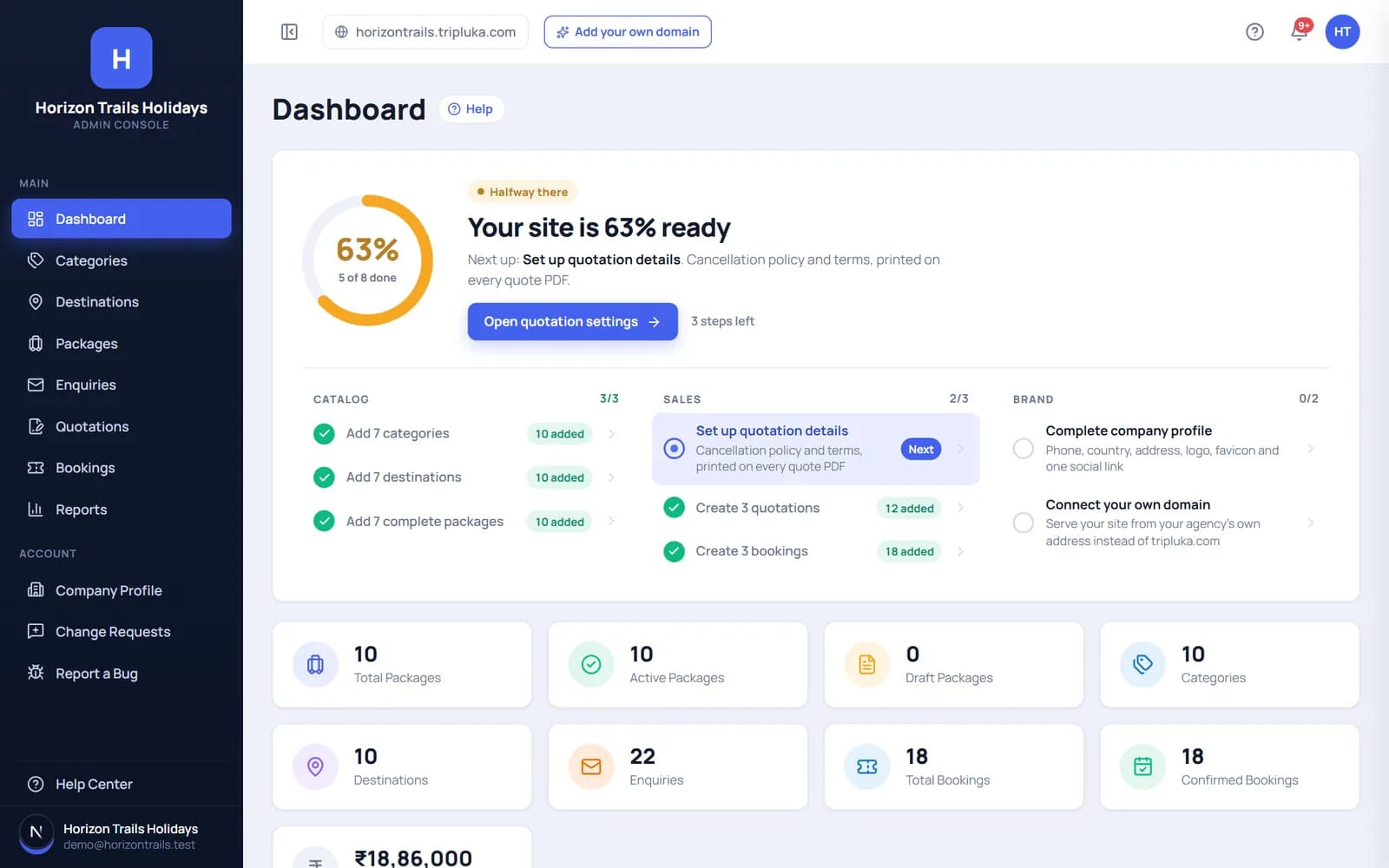
- Register your agency. Enter your agency name and details. Your website starts serving at yourbrand.tripluka.com straight away, with a setup checklist on the dashboard.
- Complete your company profile. Add your phone, country, address, logo, browser-tab icon and at least one social link. These appear across your website and on every quote PDF.
- Add categories. Think in how travellers shop: Honeymoon, Family, Weekend getaways, Adventure, Pilgrimage. Aim for seven; they become your website’s menus and filters.
- Add destinations. Kerala, Goa, Dubai, Bali and so on, each with a photo and a short description. Aim for seven here as well.
- Create complete packages. Title, description, category, destination, duration, adult, child and infant prices, a day-by-day itinerary, inclusions, exclusions and photos. Or describe the trip in one line or a voice note and let the AI package builder draft it for you to edit. Fill in each package’s meta title and description for Google.
- Choose a theme and edit your homepage. Pick one of the eight themes, then set the headline, featured packages, featured categories and destinations. Changing the theme later never touches your packages.
- Fill in your pages. About us (your story and team), Testimonials, FAQ, Contact, Terms and Privacy. Real reviews and a real team photo do more for trust than any design choice.
- Turn on WhatsApp and tracking. Add your WhatsApp number for the chat button, your Google Tag Manager or Analytics ID, and verify the site in Google Search Console.
- Set up quotations. Add your quote number prefix, validity, currency, cancellation policy and standard terms once; every quote PDF uses them.
- Connect your own domain (free). Point your domain to Tripluka and SSL is handled for you; the tripluka.com address drops out of sight.
Add a tour package step by step, build one from a voice brief with the AI package builder, export a PDF brochure and see it live on your travel website.
Test the whole booking path before you share the link
Most launch problems are found by the first customer. Find them yourself instead, on your phone as well as a laptop:
- Send an enquiry from a package page, the way a traveller would.
- Find it in your enquiries. It should arrive in the pipeline as New, with the package and dates attached.
- Reply on WhatsApp from the enquiry, so you know the chat button and number work.
- Create a quote from that enquiry and send yourself the PDF. Check the logo, totals, itinerary and terms.
- Convert it to a booking and record a part payment, so the balance due shows correctly.
- Delete or mark the test records so your reports start clean.
Pre-launch checklist
| Check | Why it matters | |
|---|---|---|
| Packages | 7+ complete, with photos | Thin pages lose visitors and rarely rank |
| Prices | Starting price on every package | Hidden prices send people back to Google |
| Contact | Phone, WhatsApp, email visible | Travellers want a person, not a form only |
| Mobile | Every page checked on a phone | Most travel browsing is on mobile |
| Trust | About us, real reviews, address | People pay agencies they can verify |
| Legal | Terms, privacy, cancellation policy | Required for quotes and disputes |
| Search Console verified | Shows which searches find you | |
| Path test | Enquiry → quote → booking done | Catches problems before customers do |
Your first 30 days after launch
- Week 1: share the link on WhatsApp status, your Google Business Profile and every social profile. Put it in your email signature.
- Week 2: ask five recent customers for a review and add them to your Testimonials page.
- Week 3: open Search Console and look at which searches show your pages. Improve the titles of packages that appear but get few clicks.
- Week 4: add two or three new packages for the next season, and retire anything you no longer sell.
Comparing builders before you commit? Read our ranking of the best travel agency website builders or the 12 questions to ask before choosing one.
Common launch mistakes
- Launching with sample content. Placeholder trips and stock testimonials are easy for travellers to spot.
- No price anywhere. “Contact us for price” on every package loses people who are still comparing.
- One giant page. Each trip needs its own page to show up for searches like “Kerala honeymoon package 5 days”.
- Enquiries going to an inbox nobody checks. Use the pipeline and set a habit of answering the same day.
- Waiting for perfect. Launch with seven good packages and improve weekly.
Questions agents ask
Can I create a tour booking website without coding?
Yes. Travel website builders handle the design, hosting and booking pages, so you only add your trips, photos and details. On Tripluka your site is live from sign-up.
How long does it take to launch a tour booking website?
The site itself takes minutes. Adding seven complete packages, your pages and settings usually takes an afternoon to a couple of days, depending on how ready your content is.
How many packages should I launch with?
At least seven complete ones, each with a description, category, destination, duration, itinerary and photo. Quality matters more than count.
Can customers book and pay online?
Visitors can send an enquiry or book a package from your Tripluka website, and each booking tracks the amount paid and the balance due. To take payments online, connect Stripe, PayPal or Razorpay for free and clients pay you directly; you keep 100% of every payment, minus only the gateway’s usual processing fee.
Do I need my own domain to launch?
No. You can launch on yourbrand.tripluka.com and connect your own domain later for free, with SSL included.
How we compared
These steps follow the setup checklist built into the Tripluka dashboard and the Tripluka Help Center articles for each screen, checked in November 2026. The general advice on what to prepare and test applies to any website builder.
- Dashboard and setup checklistTripluka Help Center, Getting started
- Tripluka featuresEverything in the free plan
- Google Search Console Free tool to see which searches find your site